Why Every Small Business Needs a Fast, SEO-Ready Website (And How to Get One on a Budget)
Most customers judge a business by its website in seconds. Learn why speed, mobile design and built-in SEO matter for small businesses, and how a budget-friendly Next.js website scored 96-100 on Google Lighthouse.
Today, most customers find a business the same way: they search on Google, open a few websites on their phone, and decide in seconds who looks trustworthy. If your website is slow, hard to use, or invisible on Google, those customers go to your competitor.
The good news is that a professional website no longer requires a huge budget. In this guide, we explain what really matters for a small business website, including speed, mobile design, SEO and accessibility, and share a real example from one of our recent projects.
1. Your Website Is Your First Impression
For salons, clinics, restaurants, gyms and local shops, the website is often the first interaction a new customer has with the brand. Before they call or visit, they check:
- Does the website look professional?
- Does it load quickly on my phone?
- Can I easily find services, prices and contact details?
- Does this business look trustworthy and active?
If the answer to any of these is "no", many visitors leave without a second thought. A website is not just an online brochure. It works for your business every day, even when your shop is closed.
2. Speed Is Not Optional
Visitors expect pages to open almost instantly. A slow website frustrates users, and Google also takes page experience into account when ranking sites.
Google measures page experience through Core Web Vitals, which focus on three things:
- Loading speed: how quickly the main content appears on screen
- Interactivity: how fast the page responds when a visitor taps or clicks
- Visual stability: whether the layout jumps around while the page loads
Modern frameworks like Next.js help here because they support server-side rendering, automatic code splitting and an optimized build, so pages reach the visitor faster than on many traditional, heavy websites.
Common Reasons Websites Are Slow
- Very large, uncompressed images
- Too many plugins or unused scripts
- Cheap or overloaded hosting
- Heavy page builders that add unnecessary code
- No caching or optimization on the server
Fixing these issues is often the quickest way to improve both user experience and search visibility.
3. Design for Mobile First
Most local customers browse on their phones. A mobile-first design means we plan the small-screen experience first and then scale it up for larger devices. In practice, this means:
- Text that is readable without zooming
- Buttons that are easy to tap with a thumb
- Clean navigation with fewer distractions
- Contact details, call buttons and maps that are easy to reach
- Layouts that scale smoothly to tablet and desktop
When the mobile experience is smooth, visitors stay longer and are more likely to get in touch. Google also uses the mobile version of a website for indexing, so a poor mobile site can hurt your search visibility.
4. SEO Should Be Built In, Not Added Later
Many businesses build a website first and think about SEO months later. It is much better to include it from day one. Technical SEO is the foundation, and it includes:
- A clear heading structure on every page (one H1, then H2 and H3 sections)
- Unique page titles and meta descriptions
- Fast loading and clean, crawlable code
- Descriptive alt text on images
- A sitemap and a robots file so search engines can discover your pages
- Accessible design that works for everyone
This gives Google a clear picture of your site and makes it easier for new customers to find you.
Technical SEO vs Content SEO
Technical SEO makes sure search engines can read and understand your website. Content SEO makes sure your pages answer what people are actually searching for. You need both. A fast website with no useful content will not rank, and great content on a slow, broken website will struggle too.
Local SEO for Small Businesses
If you serve customers in a specific area, local SEO matters just as much:
- Create and complete your Google Business Profile
- Keep your business name, address and phone number consistent everywhere
- Mention your city or area naturally in your page content
- Encourage happy customers to leave honest reviews
- Add a map and clear directions on your contact page
5. Accessibility Helps Everyone
Accessibility is not only about compliance. Good color contrast, readable text, proper labels and a logical page structure make the website easier for all visitors, including people using screen readers or other assistive tools. It also tends to improve overall quality and supports SEO, because accessible pages are usually cleaner and better structured.
6. A Real Example: Glossy Beauty Salon
We recently built a website for Glossy Beauty Salon using our Growth Package ($150). The site is built with Next.js, React and Tailwind CSS, with speed, accessibility and SEO planned from the start.
The result on Google Lighthouse:
- Performance: 96
- Accessibility: 96
- Best Practices: 100
- SEO: 100

The site went live only a few days ago and has already started attracting real visitors, with 23 active users and 57 page views in its first days.
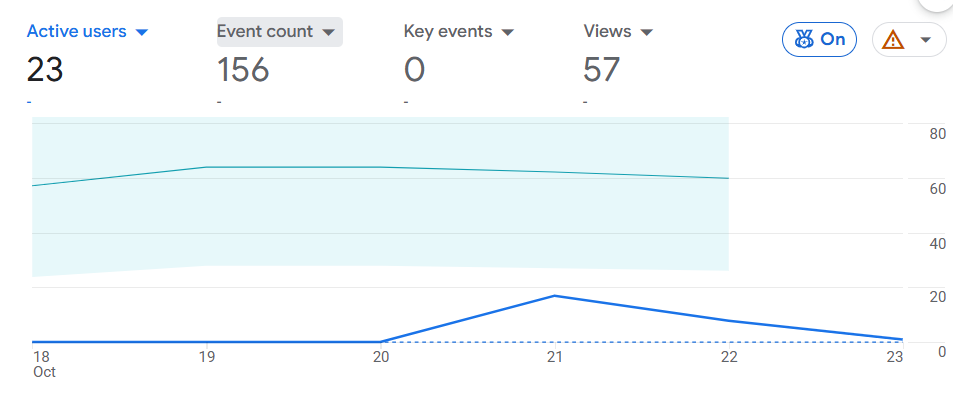
It is early, but it shows what a well-built foundation can do for a new domain. You can read the full breakdown in our Glossy Beauty Salon case study.
7. What a Good Small Business Website Should Include
Whether you are starting from scratch or redesigning an old site, make sure these basics are covered:
- A clear homepage: what you do, who it is for and how to contact you, visible within seconds
- Service pages: one page per main service, with simple descriptions
- Contact options: phone, WhatsApp, email, form and map
- Trust signals: reviews, testimonials, real photos and past work
- Strong calls to action: buttons like "Book Now" or "Contact Us" placed where visitors need them
- Security: HTTPS enabled on the whole website
- Analytics: Google Analytics and Search Console to track what is working
8. How to Hire the Right Web Developer
Before you choose an agency or freelancer, ask:
- Will my website be mobile-friendly and fast?
- Is basic SEO included?
- Which technology will it be built with?
- Can I see real examples and results?
- Who will help me if something needs to change after launch?
- Will I own my website, domain and content?
Clear answers to these questions usually tell you if you are in good hands. Be careful of anyone who promises "number 1 on Google" in a few days, because no honest developer can guarantee that.
9. Mistakes to Avoid
- Choosing the cheapest option without checking quality or speed
- Using heavy templates with dozens of plugins you do not need
- Ignoring mobile users
- Publishing without page titles, descriptions or alt text
- Never updating the website after launch
- Not tracking visitors, so you never know what is working
Frequently Asked Questions
Final Thoughts
A fast, mobile-friendly and SEO-ready website is one of the best investments a small business can make. You do not need a massive budget, but you do need the right approach and a team that treats performance and quality as part of the job.
Want a website like this for your business? Contact Codezotic today and let's build your digital presence together.
- #Web Development
- #Next.js
- #SEO
- #Small Business
- #Website Speed